Why is my game flagged as a virus?
The game contains unusual file extensions like .android and .schema in the game folder. The .android files are for creating and modifying androids, while .schema files represent playable 'scenes'. These features make the game easily modifiable but may trigger antivirus warnings.
What should I do if my Unity version is outdated?
Update to a newer Unity version to fix security vulnerabilities. If you need an immediate solution, use a provided fixed UnityPlayer.dll file by extracting and replacing the original one in your game folder.
How do I open a panel in the game?
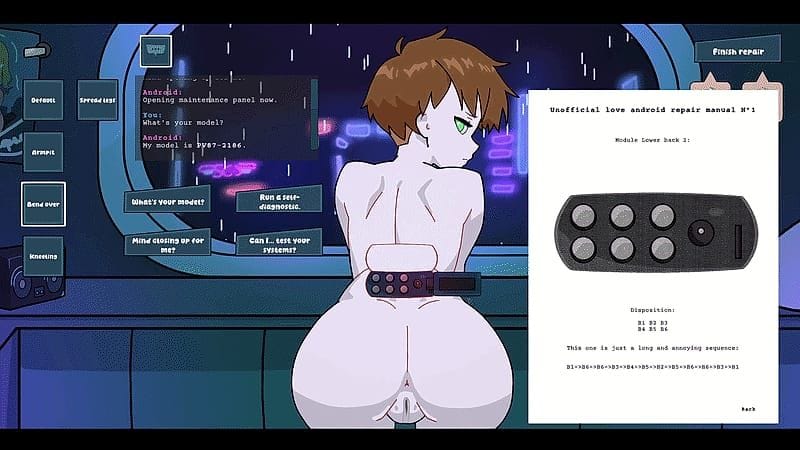
To open a panel, perform a single motion with the mouse and release it only at the end. This action should trace an 'L' shape to activate the panel correctly.
What does tapping ENTER do when interacting with androids?
Tapping ENTER changes the appearance of the android you are interacting with.
Is there a zoom feature in the game?
You can zoom using double-clicking with the right mouse button.
Are future scenarios planned that don't involve working at a workshop?
Yes, multiple scenarios are being planned to cater to different playstyles. Some will offer a more relaxed gameplay experience outside of workshops.
Is there support for futa/femboy androids in the future?
The developer is considering adding support for futa and femboy android options.
How to open the manual at the malfunctions tab?
Press the small manual icon at the bottom right corner of the screen, then click on 'malfunctions'. Alternatively, pressing Enter can trigger debug functions.
Where are save files located?
Save files are stored at C:\Users\[USERNAME]\AppData\LocalLow\SleepyWorkstation\Love Android Workshop\Datas\Saves. Old saves can cause issues; delete the SleepyWorkstation folder to resolve problems.
Why does my screen darken when interacting with androids?
Screen darkening is related to features like kissing, where the android is kneeling and you click on her mouth to kiss her. The darkness should return to normal after interaction ends.
Why do notifications block the game on mobile?
The tools are currently in the upper right corner, which can pull down the notification bar. It is recommended to have them relocated to another area like the middle or bottom left.
Can I change my character's skin color and genre?
Yes, you can change your character's skin color and genre in the creation menu.
Where can I download the latest version of the game?
Download the latest version from itch.io as it is more up to date than other sources.
What should I do if kissing an android while she is kneeling doesn't work?
This issue should be fixed in today's update.
How do you open an android's torso panel?
1. Determine the required position (armpit, kneeling, or bent over) from the manual. 2. Perform the L shape gesture with your mouse to open the panel. 3. Follow the manual according to the panel design and her model ID. 4. Insert the USB again to finalize repair. It becomes easier after the first time.
Why can't I find a defective android in the 'Care' scenario?
This feature may not be implemented yet.
Why does my game get flagged as a virus?
Some antivirus software on mobile devices may block games that are not from official app stores. Try updating your device and turning off/on it to resolve this issue.
How can I increase reputation in the game?
Reputation increases with each work session, even though it's currently not optimized due to lack of events. Increasing reputation will also boost girls' affection.
What should I do if my screen is too small on mobile devices?
You can zoom in and out by pinching the screen or adjusting text size in settings.
Is there a way to switch between male and female protagonists easily?
Currently, switching between male and female protagonists requires a full separate playthrough. There's no quick switch option available yet.
Why can't I find the android model on mobile devices?
The developer is working on an improved method to get the android model. For now, use the new camera tool and scan the QR code on her armpit.
Is there customization available for characters?
Yes, there is a lot of customization available, including mod support which will likely add more options. Currently, you can get additional haircuts by supporting the game.
Will there be an arousal system in future updates?
The arousal system is not implemented yet, but it is planned for future updates.
Is x-ray mode available or planned?
X-ray mode with the camera tool is already available. Future inclusion of additional x-ray features is possible.
What does the 'love' stat do and how can I increase it?
The love stat is not implemented yet, so there are no current ways to increase it.
Why does the vignette effect remain after using tongue action if I press finish repair early?
This is a known bug and should be fixed in version 0.55.
Can text size settings be applied to the manual?
Currently, there are no specific text size settings for the manual, but improvements to UI/UX and more settings are being worked on to make the game easier to read.